

🏗️ KYC Architecture and Components
📊 KYC Architecture Diagram
🏛️ KYC Architecture and Components
The KYC (Know Your Customer) system is a modular platform for automated user identity verification using uploaded document images, selfies, and other sources. The system’s architecture flexibly adapts to various business scenarios and requirements: from banks and fintech to marketplaces and government services.
Supported Scenarios:
- Document — the user sends a photo of their passport, ID card, or other identification document.
- Selfie with document — verification of the user’s face against the photo in the document.
- Selfie — verification with a single facial image.
- Liveness check — confirmation that a live person is in front of the camera, not a photo or a fake.
- Combined scenarios — for example, document + selfie with document + Liveness.
Purpose of system components:
Each KYC component is responsible for a specific stage of processing and verification:
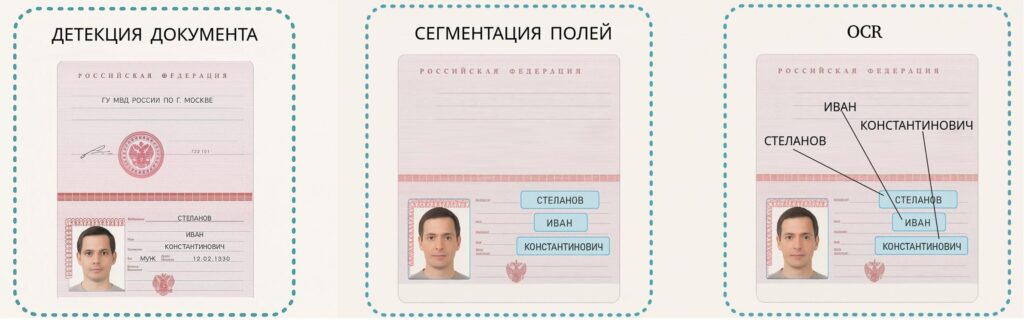
- Document Image Processing: detection, alignment, classification, and segmentation of the document into fields (photo, full name, dates, etc.).
- Optical Character Recognition (OCR): data extraction and checksum verification.
- Face image analysis: comparison of the face with the photo in the document, age and gender estimation.
- Anti-fraud mechanisms: detection of photocopies, screenshots, Photoshop, screens, physical wear.
- Liveness Check: determining if a live person is in front of the camera.
- Integrations with external systems: verification of the document and user against databases of the Ministry of Internal Affairs, FSSP, and blacklists.
- Decision Engine: the final stage where all results are aggregated and a decision is formed: “Approved”, “Rejected”, or “Requires further review”.
Thus, the KYC architecture is built around a set of independent, scalable, and interconnected modules, allowing it to be quickly adapted to any verification requirements and scenarios.
🗂️ Module Architecture and Interaction
Text diagram of the interaction for a typical scenario DOCUMENT + SELFIE WITH DOCUMENT
User sends images (document + selfie with document) via WebSDK/API
                                  |
                                  v
                           +---------------+
                           |  API Gateway  |
                           +-------+-------+
                                   |
   +-----------------+-------------+-------------+------------------+
   |                 |             |             |                  |
   v                 v             v             v                  v
+---------------+ +---------------+ +------------------+ +------------------+
|  Document     | |  Selfie       | |  Liveness Check  | | External         |
|  Detector     | |  Detector     | | (liveness check) | | Databases        |
|(document photo)| |(selfie w/doc.)| |                  | |(MVD, FSSP, etc.) |
+-------+-------+ +-------+-------+ +---------+--------+ +---------+--------+
        |                 |                   |                    |
        v                 v                   |                    |
+-----------------+ +-------------------+     |                    |
| Quality Check   | | Selfie Check      |     |                    |
|(format, size,   | | - Face Matching   |     |                    |
| illumination,   | | - Gender, age     |     |                    |
| alignment)      | | - Document Detector|     |                    |
+-------+-------+ |                   |     |                    |
| --- |
        v           |                   |     |                    |
+-----------------+ +---------+---------+     |                    |
|Document Type    |           |               |                    |
|Classification   |           |               |                    |
+-------+---------+           |               |                    |
| --- |
        +-----------+         |               |                    |
        |           |         |               |                    |
        v           v         v               v                    v
+--------------+ +------------------+ +-----------------+ +----------------+
| Document     | | Anti-fraud checks| | Liveness Check  | | External DB    |
| Segmenter    | |(screens, copy,  | | Result          | | Check Result   |
|(fields, photo,| |editor, wear and | |                 | |                |
| signature,   | |tear, logic)      | +--------+--------+ +-------+--------+
|stamp)        | +---------+---------+          |                  |
+------+-------+                    |                  |
| --- |
       v                   v                    |                  |
+--------------+    +-----------------+         |                  |
|      OCR     |    | Anti-fraud      |         |                  |
|(recognition, |   | Check Results   |         |                  |
|sticker/       |   |                 |         |                  |
|overprint check)|   +-----------------+---------+------------------+
+------+--------+                    |
       |                             |
       +-------------+---------------+
                     |
                     v
              +----------------+
              | Decision Engine|
              |(Decision Center)|
              +--------+-------+
                       |
                       v
                 +-------------+
                 |  Result     |
                 |(Approved /  |
                 | Rejected /  |
                 |Additional   |
                 |check)       |
                 +------+------+
                        |
                        v
                 +---------------+
                 |  API Gateway  |
                 +-------+-------+
                         |
                         v
                   User
1. Document Detection
Responsible for checking the presence of a document in the image, photo quality, and its preparation for further processing.
Functions:
- File format check (JPEG, PNG)
- Check image size and resolution
- Check for lighting and absence of shading
- Document alignment and normalization on the image
2. Selfie with Document Detection
Responsible for verifying selfies with documents, matching user data, and preventing fraud.
Functions:
- Comparison of the face on the document and the selfie (Face Matching)
- Verification of user’s age and gender against document data
- Check for signs of screens (photos from a phone screen, monitor)
- Check for signs of graphic editor tampering
- Check for signs of photocopies or printouts
- Document detection on selfie and its type determination
3. User Liveness Check
Responsible for confirming that a live person is in front of the camera, not a photograph, video recording, or a fake synthetic image. The module analyzes facial behavior, skin texture, micro-movements, and signs of real presence.Features:
- Analysis of serial images or video for signs of a living person
- Discarding photos or records from screens and paper media
- Deepfake detection in photos and videos The neural network identifies signs of generative editing, replaced faces, “face swapping,” and GAN artifacts
- Detection of fully generated images Identification of photos created by neural networks (GAN/Stable Diffusion/FaceApp, etc.), including inconsistencies in textures, lighting, depth, and generation artifacts
4. External Database Verification
Responsible for verifying the user against official registries, government databases, financial data, and sanctions lists. The module aggregates data from multiple sources and generates a structured result.Functions:
- Document and Identity Status Check
- Check passport validity against official sources
- Driver’s license check
- Comprehensive passport check (series/number, loss, blocks)
- Debt and Financial Checks
- Check for debts of individuals in the FSSP
- Check tax debts
- Check the taxpayer status of NPD (self-employed)
- Financial scoring of credit bureaus
- Short-term loan default scoring
- Collateral check
- Check the activity and expiration date of the phone number
- Full name–phone binding confirmation
- Judicial and legal checks
- Check against the list of bankrupts
- Search for bankruptcy cases in arbitration courts
- Check arbitration cases
- Checking cases in courts of general jurisdiction
- Check against the database of nominal directors
- Check communication with legal entities
- Wanted check: — Ministry of Internal Affairs — Federal Bailiff Service — Federal Penitentiary Service
- Identity Verification Checks
- SNILS ↔ Full Name Compliance Check
- Obtaining TIN by full name and passport data
- Check email and full name compliance
- Check the use of the number by a specific individual
- Sanctions and Restrictions
- Check against the list of terrorists
- Sanctions screening of individuals (EU, UK, OFAC, UN, etc.)
- Check blocked accounts for sole proprietors
- Check in the registry of foreign agents
- Check in the registry of alimony debtors
5. Document Classification & Segmentation
Determines the type of the uploaded document and highlights key elements for further processing.
Functions:
- Document classification (passport, driver’s license, ID card, etc.)
- Segmentation of the document into separate areas (text fields, photograph, signatures, stamps)
6. Document Field Recognition and Verification (OCR & Field Verification)
Recognizes document text and verifies the authenticity of its individual elements.
Functions:
- OCR recognition of text from segmented fields
- Check for inserts or drawings in the document fields
- Checksum verification (e.g., MRZ code)
7. Document Antifraud Checks
Responsible for identifying fraud attempts and document forgery.
Functions:
- Checking photos of documents taken from device screens (mobile, monitors, TVs)
- Identification of signs of photocopies or printed documents
- Check for graphic editor interference (field editing)
- Check the degree of document deterioration (damage, signs of wear)
- Check for logical inconsistencies in document fields (dates, numbers, series)
8. Decision Engine
Aggregates the results of all modules, makes the final decision on the KYC procedure.
Functions:
- Collection and analysis of verification results (selfie with document, OCR, anti-fraud, Liveness, external databases)
- Issuance of the final decision based on the results of the inspection: “Approved”, “Rejected”, or “Requires additional inspection”
- Generation of error codes and descriptions (if any)