


The Mobile SDK runs a whole identity verification — the document and the liveness check, from start to verdict — in its own full-screen native screen. Your app makes one call and gets one result back.
- Native SDKs for Android (Kotlin, Jetpack Compose) and iOS (Swift, SwiftUI).
- Plugins for Flutter and React Native over the native SDKs.
- The same verification as the Web SDK: the same scenarios, screens, texts and verdicts.
How it works
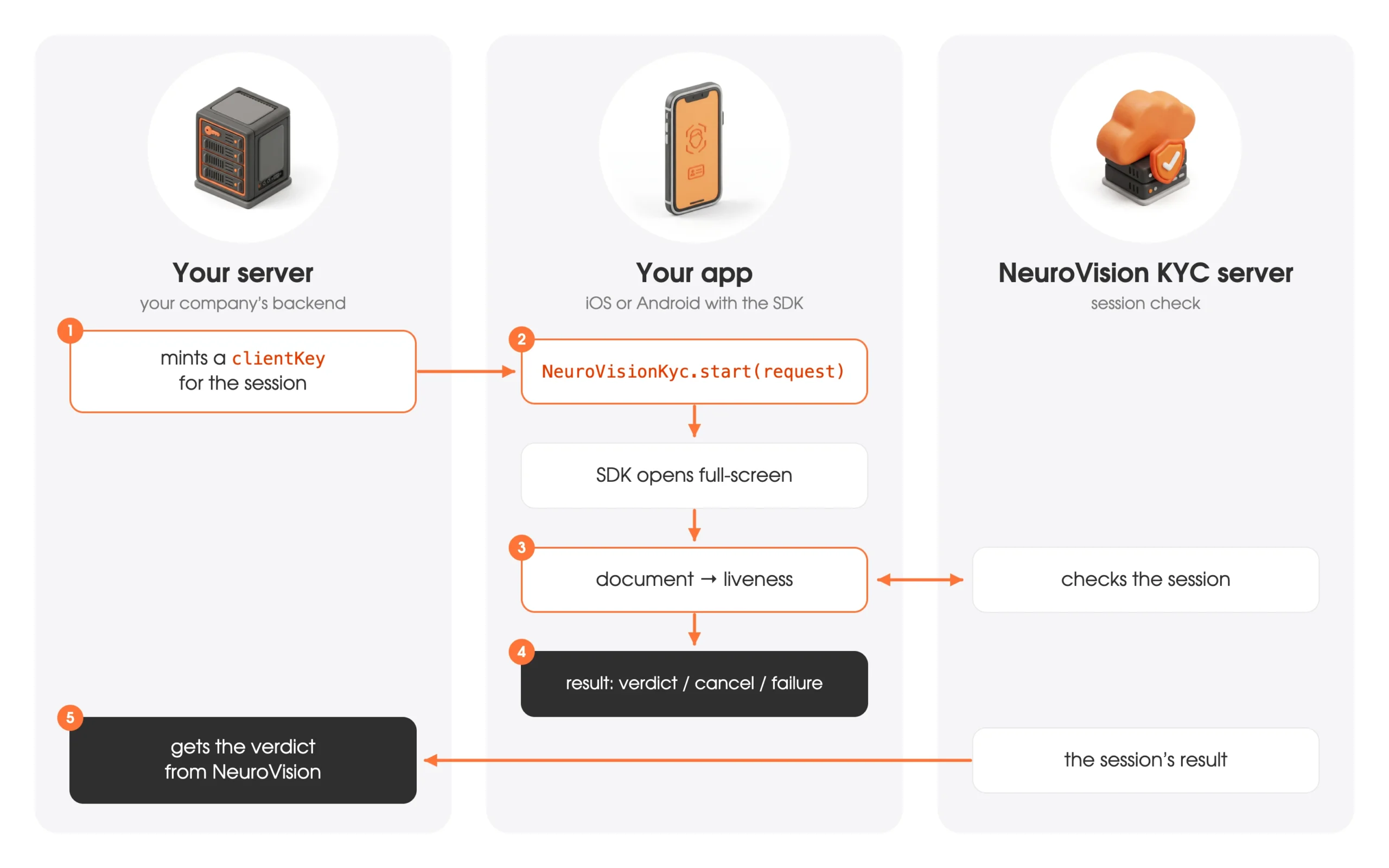
- Your server encrypts
clientKey— your identifier for this verification — with your scenario secret key. The secret never enters the app — see Server integration. - Your app passes
apiHost,schemaIdandclientKey(or ataskId) to the SDK. - The SDK shows its own screens: consent, document capture, liveness check, result. It asks for the camera permission itself.
- The app gets exactly one result: a verdict, a cancel, or a failure with its reason — see Results.
The call, in short
// Android
val kyc = registerForActivityResult(NeuroVisionKyc.contract()) { result -> /* KycResult */ }
kyc.launch(KycRequest(apiHost, schemaId, clientKey))
// iOS
let screen = NeuroVisionKyc.makeViewController(request: KycRequest(apiHost: apiHost, schemaId: schemaId, clientKey: clientKey)) { result in
controller.dismiss(animated: true)
}
controller.present(screen, animated: true)// Flutter
final result = await NeuroVisionKyc.start(KycRequest(apiHost: apiHost, schemaId: schemaId, clientKey: clientKey));// React Native
const result = await NeuroVisionKyc.start({ apiHost, schemaId, clientKey });Requirements
| Platform | Requirements |
|---|---|
| Android | minSdk 26 (Android 8.0), compileSdk 35+, Android Gradle Plugin 8.6+, Kotlin 2.0+; arm64-v8a and armeabi-v7a devices |
| iOS | iOS 15.0+, Xcode 26+ |
| Flutter | Flutter 3.47+ (Dart 3.13); on Android AGP 8.11.1+ and Kotlin 2.2.20+ |
| React Native | 0.87+ (New Architecture), CocoaPods on iOS; Expo is not supported yet |
Sessions run on a real camera: use an Android phone or an arm64 emulator (an x86_64 emulator will not do) and an iPhone (the iOS simulator has no camera).
Interface
- Languages: 29 — English, Spanish, Russian, German, French, Portuguese, Lithuanian, Czech, Slovak, Estonian, Hungarian, Latvian, Polish, Romanian, Greek, Indonesian, Ukrainian, Vietnamese, Italian, Georgian, Simplified Chinese, Croatian, Hindi, Hebrew, Arabic, Turkish, Korean, Kyrgyz, Uzbek. Arabic and Hebrew read right to left. By default the scenario's language is used, else the device's; the app can set one with the
languageparameter. - Theme: light or dark — the scenario's choice by default; the app can set one with the
themeparameter. - Look and texts are set in the scenario in your dashboard, as for the Web SDK.
- The session's screen is full-screen and portrait.
Where to go next
| Quick start |
| Server integration |
| Android · iOS · Flutter · React Native |
| Results |
| Analytics and privacy |
| Troubleshooting |
Current limitations
- No passport NFC chip step yet.
- Android: arm64-v8a and armeabi-v7a devices only.
- The session runs in its own full-screen native screen; it cannot be embedded into a view of your app.
